之前也简单的使用过Android的AIDL,但也都是局限于使用,至于启动的原理等都没去了解。
记录一下个人对AIDL的理解,方便自己查阅。
正文
之前AIDL的简单Demo:《》和《》。
回归正题。
AIDL是Android Interface Definition Language(Android 接口定义语言)的缩写,它是Android进程间通信的接口语言。
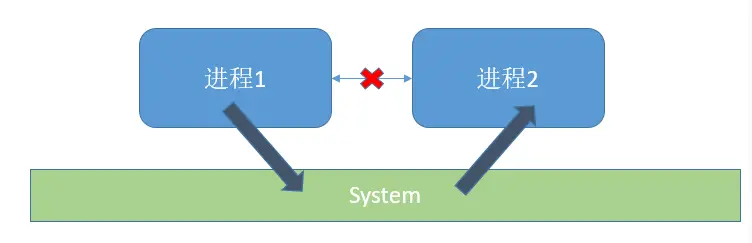
AIDL是Binder的延伸。Android为我们提供的一种简单实现Binder的工具。
IMedia.aidl
我们定义一个IMedia.aidl
# 比较简单,主要是方便介绍
interface IMedia {
    boolean start();
    void stop();
}
下面是AIDL主要涉及的类名
Stub
Proxy
Stub
IMedia.java
Android studio,build一下,会自动生成IMedia.java。在build\generated\aidl_source_output_dir\debug\out\com\biumall\aidllib/IMedia.java。
public interface IMedia extends android.os.IInterface { public static class Default implements com.biumall.aidllib.IMedia { @Override public boolean start() throws android.os.RemoteException { return false; } @Override public void stop() throws android.os.RemoteException { } @Override public android.os.IBinder asBinder() { return null; } } public static abstract class Stub extends android.os.Binder implements com.biumall.aidllib.IMedia { private static final java.lang.String DESCRIPTOR = "com.biumall.aidllib.IMedia"; public Stub() { this.attachInterface(this, DESCRIPTOR); } public static com.biumall.aidllib.IMedia asInterface(android.os.IBinder obj) { if ((obj == null)) { return null; } android.os.IInterface iin = obj.queryLocalInterface(DESCRIPTOR); if (((iin != null) && (iin instanceof com.biumall.aidllib.IMedia))) { return ((com.biumall.aidllib.IMedia) iin); } return new com.biumall.aidllib.IMedia.Stub.Proxy(obj); } @Override public android.os.IBinder asBinder() { return this; } @Override public boolean onTransact(int code, android.os.Parcel data, android.os.Parcel reply, int flags) throws android.os.RemoteException { java.lang.String descriptor = DESCRIPTOR; switch (code) { case INTERFACE_TRANSACTION: { reply.writeString(descriptor); return true; } case TRANSACTION_start: { data.enforceInterface(descriptor); boolean _result = this.start(); reply.writeNoException(); reply.writeInt(((_result) ? (1) : (0))); return true; } case TRANSACTION_stop: { data.enforceInterface(descriptor); this.stop(); reply.writeNoException(); return true; } default: { return super.onTransact(code, data, reply, flags); } } } private static class Proxy implements com.biumall.aidllib.IMedia { private android.os.IBinder mRemote; Proxy(android.os.IBinder remote) { mRemote = remote; } @Override public android.os.IBinder asBinder() { return mRemote; } public java.lang.String getInterfaceDescriptor() { return DESCRIPTOR; } @Override public boolean start() throws android.os.RemoteException { android.os.Parcel _data = android.os.Parcel.obtain(); android.os.Parcel _reply = android.os.Parcel.obtain(); boolean _result; try { _data.writeInterfaceToken(DESCRIPTOR); boolean _status = mRemote.transact(Stub.TRANSACTION_start, _data, _reply, 0); if (!_status && getDefaultImpl() != null) { return getDefaultImpl().start(); } _reply.readException(); _result = (0 != _reply.readInt()); } finally { _reply.recycle(); _data.recycle(); } return _result; } @Override public void stop() throws android.os.RemoteException { android.os.Parcel _data = android.os.Parcel.obtain(); android.os.Parcel _reply = android.os.Parcel.obtain(); try { _data.writeInterfaceToken(DESCRIPTOR); boolean _status = mRemote.transact(Stub.TRANSACTION_stop, _data, _reply, 0); if (!_status && getDefaultImpl() != null) { getDefaultImpl().stop(); return; } _reply.readException(); } finally { _reply.recycle(); _data.recycle(); } } public static com.biumall.aidllib.IMedia sDefaultImpl; } static final int TRANSACTION_start = (android.os.IBinder.FIRST_CALL_TRANSACTION + 0); static final int TRANSACTION_stop = (android.os.IBinder.FIRST_CALL_TRANSACTION + 1); public static boolean setDefaultImpl(com.biumall.aidllib.IMedia impl) { if (Stub.Proxy.sDefaultImpl == null && impl != null) { Stub.Proxy.sDefaultImpl = impl; return true; } return false; } public static com.biumall.aidllib.IMedia getDefaultImpl() { return Stub.Proxy.sDefaultImpl; } } public boolean start() throws android.os.RemoteException; public void stop() throws android.os.RemoteException; }
我们根据Server端和Client端中使用的代码进行相关的介绍。
Server端
下面是Server端简单的一个写法。
(1).IMediaBinder继承IMedia.Stub。
(2) onBind()返回IMediaBinder对象。
public class MediaService extends Service {
    @Nullable
    @Override
    public IBinder onBind(Intent intent) {
        //返回实现的Stub对象。
        return new IMediaBinder();
    }

    private static class IMediaBinder extends IMedia.Stub {
        @Override
        public boolean start() throws RemoteException {
            return false;
        }

        @Override
        public void stop() throws RemoteException {
        }
    }
}
IMediaBinder对象
new IMediaBinder();调用默认的构造函数,最终会调用到其父类IMedia.Stub的构造函数
Stub
private static final java.lang.String DESCRIPTOR = "com.biumall.aidllib.IMedia"; public Stub() { this.attachInterface(this, DESCRIPTOR); }
attachInterface()在Binder中的方法。
Binder
public void attachInterface(@Nullable IInterface owner, @Nullable String descriptor) {
    mOwner = owner;
    mDescriptor = descriptor;
}
也就是Stub赋值给mOwner,DESCRIPTOR赋值给mDescriptor。
如果是本地Binder,会用到;但远程Binder就不走这里的,下面有介绍。
回到Stub类,Stub继承Binder,并实现于IMedia,但Stub是抽象类,不需要实现IMedia的方法(其子类IMediaBinder实现了)。
这里主要关注onTransact(),这里是Binder把Client的请求反馈到这里的。
可以看到,这里是根据code值进行执行不同的方法。
也就是Client端发送时也带上了对应的code值。当然,我们知道Client端只调用Proxy中的方法,后面有介绍。
public static abstract class Stub extends android.os.Binder implements com.biumall.aidllib.IMedia {
    //略

    static final int TRANSACTION_start = (android.os.IBinder.FIRST_CALL_TRANSACTION + 0);
    static final int TRANSACTION_stop = (android.os.IBinder.FIRST_CALL_TRANSACTION + 1);

    @Override
    public boolean onTransact(int code, android.os.Parcel data, android.os.Parcel reply, int flags) throws android.os.RemoteException {
        java.lang.String descriptor = DESCRIPTOR;
        switch (code) {
            case INTERFACE_TRANSACTION: {
                reply.writeString(descriptor);
                return true;
            }
            case TRANSACTION_start: {
                data.enforceInterface(descriptor);
                //调用IMediaBinder的start()
                boolean _result = this.start();
                reply.writeNoException();
                //reply写入返回值
                reply.writeInt(((_result) ? (1) : (0)));
                return true;
            }
            case TRANSACTION_stop: {
                data.enforceInterface(descriptor);
                //调用IMediaBinder的stop()
                this.stop();
                reply.writeNoException();
                return true;
            }
            default: {
                return super.onTransact(code, data, reply, flags);
            }
        }
    }
    //略
}
Client端
//Client是通过绑定Service获取Server端的IBinder private final ServiceConnection serviceConnection = new ServiceConnection() { @Override public void onServiceConnected(ComponentName name, IBinder service) { //通过asInterface转换获取IMedia对象(代理对象) IMedia mIMediaService = IMedia.Stub.asInterface(service); try { //执行start() mIMediaService.start(); } catch (RemoteException e) { throw new RuntimeException(e); } } @Override public void onServiceDisconnected(ComponentName name) { } };
onServiceConnected返回的第二个参数是IBinder,并不是我们需要的Server端对象。要获取IMedia对象,需要把IBinder进行转换一下。
mIMediaService = IMedia.Stub.asInterface(service);我们看一下asInterface中的代码
asInterface()
asInterface()在Stub中定义的
public static com.biumall.aidllib.IMedia asInterface(android.os.IBinder obj) {
    if ((obj == null)) {
        return null;
    }
    //DESCRIPTOR是查询的flag
    android.os.IInterface iin = obj.queryLocalInterface(DESCRIPTOR);
    //[重]返回值要分是本地Binder还是远程Binder
    if (((iin != null) && (iin instanceof com.biumall.aidllib.IMedia))) {
        return ((com.biumall.aidllib.IMedia) iin);
    }
    //新创建一个Proxy对象
    return new com.biumall.aidllib.IMedia.Stub.Proxy(obj);
}
关于android.os.IInterface iin = obj.queryLocalInterface(DESCRIPTOR);的返回值,推荐看参考文三。
这里也简单介绍一下。
如果是跨进程通信,onServiceConnected()中的的obj是BinderProxy对象;而同一个进程进行绑定(不是跨进程通信),返回的是Binder对象。
不同的Binder对象,导致obj.queryLocalInterface(DESCRIPTOR)返回值不一样。
Binder
public @Nullable IInterface queryLocalInterface(@NonNull String descriptor) {
    if (mDescriptor != null && mDescriptor.equals(descriptor)) {
        return mOwner;
    }
    return null;
}
根据mDescriptor进行判断进行返回,而mDescriptor的赋值在于Stub()构造函数中。
public Stub() {
    this.attachInterface(this, DESCRIPTOR);
}
因此,asInterface()返回的就是mOwner。
BinderProxy
public IInterface queryLocalInterface(String descriptor) {
        return null;
}
返回的是null,不满足条件,asInterface()继续执行,最后返回的
return new com.biumall.aidllib.IMedia.Stub.Proxy(obj);我们这里的AIDL是跨进程的,所以onServiceConnected()中通过asInterface()获取的服务的代理Proxy(obj)。
Proxy
Proxy是Stub类中的一个内部类。
定义在Stub类内部可以直接访问Stub类中的变量。
Proxy实现IMedia接口,也就是需要实现其方法,也就这里通过Binder跟Server端通信。
通过Remote.transact(),最后在Stub的onTransact()中执行Server端对应方法。
对于其中的sDefaultImpl,setDefaultImpl()和getDefaultImpl()不是很明白,虽然参考文四有介绍,但还是不太理解~_~。
private static class Proxy implements com.biumall.aidllib.IMedia { private android.os.IBinder mRemote; Proxy(android.os.IBinder remote) { //传入的obj也就是BinderProxy对象 mRemote = remote; } @Override public android.os.IBinder asBinder() { return mRemote; } public java.lang.String getInterfaceDescriptor() { return DESCRIPTOR; } @Override public boolean start() throws android.os.RemoteException { //用于存储发送数据 android.os.Parcel _data = android.os.Parcel.obtain(); //用于存储返回数据 android.os.Parcel _reply = android.os.Parcel.obtain(); boolean _result; try { //写入数据 _data.writeInterfaceToken(DESCRIPTOR); //调用Binder中的transact()用于传输数据 //start的标志Stub.TRANSACTION_start boolean _status = mRemote.transact(Stub.TRANSACTION_start, _data, _reply, 0); //start()是需要返回数据的 if (!_status && getDefaultImpl() != null) { return getDefaultImpl().start(); } _reply.readException(); _result = (0 != _reply.readInt()); } finally { _reply.recycle(); _data.recycle(); } return _result; } @Override public void stop() throws android.os.RemoteException { android.os.Parcel _data = android.os.Parcel.obtain(); android.os.Parcel _reply = android.os.Parcel.obtain(); try { _data.writeInterfaceToken(DESCRIPTOR); boolean _status = mRemote.transact(Stub.TRANSACTION_stop, _data, _reply, 0); if (!_status && getDefaultImpl() != null) { getDefaultImpl().stop(); return; } _reply.readException(); } finally { _reply.recycle(); _data.recycle(); } } public static com.biumall.aidllib.IMedia sDefaultImpl; }
小结
asInterface()中的返回值跟传入的Binder或BinderProxy,返回的值不一样
Client端获取的是Server是Server代理的还是其本身,具体看AIDL是否跨进程。
有错误,欢迎指正,本站内容是个人的理解
参考文章
《》
《Android插件化开发指南-包建强》
《》
《》